


Half-Width vs. Full-Width: A Tale of Two Characters

Half-width alphanumeric characters are letters, numbers, and symbols encoded to occupy half the horizontal space of their full width equivalents, a distinction that exists because Japanese, along with Chinese and Korean, traditionally uses full-width characters sized to fit a square grid, while English and other western languages use narrower, proportional characters by default.
In Japanese computing, half-width characters are often called single-byte characters, and full-width characters are called double-byte characters, a naming convention rooted in how much data each one takes up. This full-width and half-width character split still shows up constantly on Japanese websites and forms today, where one field might demand half width numbers and the next field demands full width characters for the same form.
If you have filled out a Japanese online form, you've likely happened upon Japan's character input types of 半角 = hankaku = half-width and 全角 = zenkaku = full-width.
These two types of Japanese character sets must be used alternatively, depending on the input field.
For example, say an online credit card form asks you to input your mailing address. Typically, this must be inserted using zenkaku full-width characters. On the same page, you might be asked to input your phone number, which must be typed using hankaku half-width characters. And on and on it goes.
👉 Quick fix while you're filling out a form: if a Japanese website rejects what you typed and asks for half-width characters or full-width characters specifically, most Windows keyboards can toggle a highlighted word between the two with a single press of F10. On a Mac, press fn plus F10 for the same effect, or fn plus F6 through F10 to cycle through Japanese input modes including half-width katakana and full-width katakana. The full explanation of why this split exists and more control options are covered below.
It's not just Japan's foreign residents who find toggling between the two character types annoying. As evidenced by numerous online discussions, Japanese, too, dislike the inconvenience of switching between full-width and half-width characters when filling out forms online.
So why hasn't this been fixed? And where did these two character types originate?

Image: Neto Labbo; Man enters information into an online form and receives an error message stating, "Please input alphanumeric in full-width characters."
What are full-width and half-width characters?
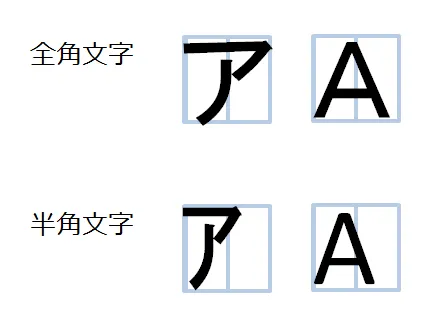
Image: Dekiru net
The above image shows full-width in the top row and half-width on the bottom row. Although they look similar, minus a little distortion, they come from different electronic character sets.
The table below provides a side-by-side visual comparison of half-width and full-width characters, including alphabets, numbers, kana, and symbols.
Half-width vs full-width characters: visual comparison with examples
Character Type |
Half-Width Example |
Full-Width Example |
Description / Notes |
Alphanumeric (Uppercase) |
A |
A |
Half-width is standard ASCII; full-width occupies double space. |
Alphanumeric (Lowercase) |
a |
a |
Same letter, different spacing and encoding. |
Numbers |
0 |
0 |
Full-width numbers often used in Japanese forms. |
Kana (Katakana) |
カタカナ |
カタカナ |
Half-width katakana uses half the space; full-width is standard. |
Kana (Hiragana) |
Not typically half-width |
ひらがな |
Hiragana is generally full-width only. |
Symbols (Hyphen) |
- |
- |
Full-width symbols are wider and used for visual consistency. |
Symbols (At sign) |
@ |
@ |
Often used in email addresses, but some systems require half-width. |
An article from Morgan Data System KK, a company that supports data entry and survey data aggregation, provides an explanation of zenkaku and hankaku, full-width and half-width characters, which I have translated and paraphrased below:
“Half-width characters are sometimes called 1-byte characters, and full-width characters as 2-byte characters. (Byte is a unit measuring the amount of data used in a computer.)
“1 byte is 8 binary digits (bits) and can show 256 different combinations. But 256 values is not enough to represent all the many Japanese letters. However, 2-byte characters (16 binary digits) are able to display 65,536 different combinations, which is sufficient for languages with many thousands of characters, such as Japanese and Chinese.”

Image: charset.7jp.net
The left-hand column of the above image shows a full-width character 「ア」 and the right-hand column shows the half-width character 「ア」. Both represent the same phonetic sound, but their source electronic character sets are different, as evidenced by their encoding.
The full-width half-width origin story
The very first standardized alphanumeric coding system, American Standard Code for Information Interchange (ASCII), traces back to a proposal submitted by IBM engineer Bob Bemer to the American National Standards Institute (ANSI) in May 1961. Bemer proposed a common underlying code for alphanumeric characters so computers from different manufacturers could communicate with each other.
The ANSI X3.4 committee spent roughly two years working through the proposal, and ASCII was formally ratified as the American standard on June 17, 1963. Bemer is widely credited today as "the father of ASCII" for his role in the standard, including his invention of the escape character.
ASCII has 8 slots (8 slots = 8 bits = 1 byte) for generating number combinations (256 patterns) which can then represent the same amount of characters of any language. English has only 94 letters, numbers, and symbols, etc., so 256 combinations was more than enough to accommodate English.
In 1969, Japanese programmers assigned half-width katakana to the remaining patterns next to the 94 alphanumeric characters, establishing the first Japanese electronic character set, then called JIS C 6220.

Image: The first Japanese electronic character set was half-width katakana, est. 1969, Japan Association of Graphic Arts Technology
Katakana, one of Japan's phonetic alphabets, was deemed sufficient for sending brief telegrams and the processes that were available in the public and private sector at that time.
Naturally, as computer functions advanced and word processing applications became a reality, a full Japanese electronic character set was needed that encompassed all of Japan's many thousands of kanji.
Lecture notes by Mr. Riyuichi Fujimoto from Kanazawa University, available here in Japanese, provide a fascinating history of the evolution in rendering Japanese characters computer-readable. The following is a brief timeline of events summarized from his discourse:
1963. ASCII characters: Computers can only render the English alphabet and numbers.
1969. ASCII characters + half-width katakana (JIS C 6220): Computers can handle half-width katakana characters. However, kanji cannot be displayed.
1978. Full-width characters (JIS C 6226.2): Kanji can now be displayed; however, there remain inconsistencies depending on the country and manufacturer.
1991. Unicode: Created to standardize language character sets through assigning uniform numbers to letters around the world, allowing computers to handle characters correctly on a computer from any country.
The current situation: no unification
At present, there are many encoding schemes that transfer Japanese electronic character sets (both half-width and full-width) into readable language across computers and programs. (This Stack Overflow thread explains the difference between character sets and encoding schemes.)
The following is a partial list of the most notable schemes that make Japanese readable.
However, as of yet, there has been no unification of Japanese electronic character sets. And so the use of both full-width and half-width persists.
Today, when filling out an online form (e.g., Japan Post's online mail forwarding), half-width is primarily used for fields where you might input an alphanumeric, such as emails, passwords, phone numbers.
Full-width is used for fields where you will need to type Japanese letters (your mail address, etc.)—in which case, the alphanumeric must be input using full-width.
If full-width is the newer/more advanced form, why are half-width characters still being used for numbers and email addresses?
Here's one answer proposed by Sphere System Consulting KK: Back in the day when computers' data processing capabilities were low, the focus was on keeping data as light and short as possible. This is why half-width characters were preferred by programmers over full-width because full-width takes up twice as much data as half-width consumes.
Additionally, in some cases, half-width katakana is preferred over full-width to present information when space is limited. For example, within bank books and receipts.
Where to go from here: solutions to the problem
Public opinion is, Japanese hate this, too, and have brought up this issue of half-width and full-width character sets on Idea Boxデジタル改革アイデアボックス, an open forum where individuals can make complaints or requests for improvement directly to the central government.
For Japanese users, one frustration is with double-byte characters not readable when typing in a URL, so they are forced to switch to half-width when inputting a URL. Full-width numbers must also be converted to half-width for phone numbers and email, etc.
For foreign residents, when typing their name using katakana, one must decide between half-width kana and full-width kana, which will vary from online form to online form and input field to input field, which often leads to mistakes that trigger delays in user task completion.
Until a unified electronic character set is adopted and enforced by the Japanese government, temporary solutions exist, which can improve the user experience on e-commerce pages and online bank and government forms.
A column written by a senior analyst of Forrester Research back in 2008 proposed a simple solution to automatically change alphanumeric characters, hiragana, and katakana to conform to a set code at the point of receiving the data.
Additionally, Grapecity Inc., which specializes in creating and providing software developer tools and other IT solutions, freely gave away their solution to solving this problem using JavaScript.
Since solutions exist, some guesses as to the lack of progress: Japan's government and corporations haven't gotten around to updating their systems, are trying to conserve space for one reason or another, or are stuck in the status quo.
“It's always been like this” is an answer as to why, but it's not a good one.
An IT manager, who provided the technical review of this article noted, “There are often hierarchical issues where management (usually older people) lack sufficient knowledge of the technical spaces they manage and are risk-averse. They are promoted by years of service and not personal aptitude or managerial skill. They won't try to fix what doesn't seem broken, and they probably don't create open spaces for their subordinates to offer progressive ideas.
“I'm sure change is also greatly hampered by bureaucratic processes. Getting from idea to implementation is a long game of discussion, forms, approvals, and waiting. Maybe some [programmers] have tried and got rejected along the way. Others may simply just not want to go through the nightmare of dealing with the process.”
Two additional tips shared with us by Christopher J. Green of J Tech Solutions K.K. for Mac users:
1. You type in kana or full-width but wanted an English word. Just press "fn" + F10 on MacOS.
2. You typed half-width but want to switch easily between modes, just press "fn" + F6, F7, F8, F9 or F10.
Frequently asked questions
What are half-width characters?
Half-width characters are letters, numbers, and symbols encoded to occupy half the space of a full width character, giving them a narrow, roughly 1:2 height to width ratio instead of a square footprint. English letters, numbers, spaces, and punctuation marks are half-width by default, since western languages were never designed around a square character grid. In Japanese computing, half-width characters are also called single-byte characters, since early encodings could represent them using a single byte, unlike the double-byte characters needed for kanji and full width kana.
How do half-width characters differ from full-width characters?
A half-width character occupies roughly half the horizontal space of a full-width character, which is sized to fit a square grid so that Japanese, Chinese, and Korean text lines up evenly regardless of which characters appear. Full-width characters exist for aesthetic and legibility reasons in languages traditionally classed as double-byte, while half-width characters were originally adopted for practical reasons, mainly to save space and processing power on early, limited hardware. The same letter or number can typically be encoded either way depending on the input field, which is why Japanese forms often specify which one they expect.
How can I convert half-width characters to full-width characters and vice versa?
On Windows, pressing F10 while a word is highlighted in an input field will typically convert it to half width. On a Mac, pressing control plus K converts to full-width katakana, and control plus semicolon converts to half-width kana, while control plus space brings up a list of available input modes if Japanese is installed. Several free online tools and JavaScript libraries also exist to convert full width and half-width characters and numbers in bulk, which is useful for cleaning up data entered inconsistently across a form or spreadsheet.
Why do Japanese websites use both half-width and full-width characters in the same form?
Different fields on the same Japanese form often expect different character sets because of decades old conventions rather than any current technical requirement. Phone numbers, passwords, and email addresses are typically encoded as half-width numbers and half-width alphanumeric characters, while name fields and mailing addresses are typically entered using full-width characters. This split originated when computing power was limited and half-width, single-byte character encoding was cheaper to process, and it has simply persisted in many systems and forms since, even though modern computers no longer need to conserve space this way.
What is the significance of half-width characters in Japanese, Chinese, and Korean computing?
Half-width characters let western style, narrow letters and numbers sit alongside full-width Japanese, Chinese, or Korean text without breaking the visual grid that those languages are traditionally built around. Half-width katakana characters specifically were Japan's first computer-readable character set, encoded in 1969 under JIS C 6220, before kanji could be displayed at all. Even after full-width kanji became standard from 1978 onward, half-width characters stayed in use for receipts, cash registers, and situations where screen or paper space was limited.
Are there any issues related to using half-width characters?
Yes, the most common issue is a website or form rejecting an entry because it was typed in the wrong character set, for example, typing full-width numbers into a field that requires half-width numbers, or vice versa. This often comes down to whether the underlying system expects a single-byte character set or a double byte character set, and many older Japanese systems still enforce one or the other strictly rather than accepting and auto-converting both. For foreign residents typing a name in katakana, deciding between half-width and full-width kana can vary from form to form, which is a frequent source of input errors and delays.
Can I set my computer to automatically convert between half-width and full-width characters?
Some systems and browser extensions can normalize full-width input to half-width automatically before it's submitted, which is the approach several developer tools, including one built by Grapecity Inc. and shared freely, use to solve this at the point of data entry. This isn't built into most Japanese government or corporate forms by default, so for now, manually switching modes with the keyboard shortcuts above remains the most reliable option on most sites.
In closing
And there you have it, the tale of two characters: half-width and full-width. A seemingly simple concept that has a profound impact on the everyday life of those living in Japan, and a testament to the intricate dance between language and technology.
More deep dives about life in Japan
👉 Use our Japan Postal Codes tool to help you find the postal codes for places throughout Japan!
Tomoko Matsuoka is a contributing editor and writer for MailMate, Shoeboxed, and a number of online resource libraries. She writes guides on life in Japan and covers Japanese business news, digitalization, and productivity tools and software.
일본 우편물 처리에 너무 많은 시간을 소비하고 있나요?
가상 우편함 + 번역 서비스는 월 3800원부터 시작합니다. 30일 환불 보장.